New features and fixes, from the latest release to the first beta.
v1.7October 1, 2026
A launcher that feels more like yours
Give Ludus a different look, discover Epic titles and keep your progress between sessions. Version 1.7 adds a visual theme creator, improves cloud saves and makes profiles, shortcuts and download choices easier to use.
English throughoutPages, settings, prompts, desktop notifications and the tray menu now use English, including when older language preferences are saved.
A direct route to sourcesThe Sources page in the app links to the website's source directory. Copy a JSON link and paste it into Ludus to add it.
Fresh installation packagesWindows gets an installer; Linux x64 gets AppImage and .deb packages for systems with glibc 2.39+. New installations include no accounts, games or personal settings.
A new look, without writing a theme file
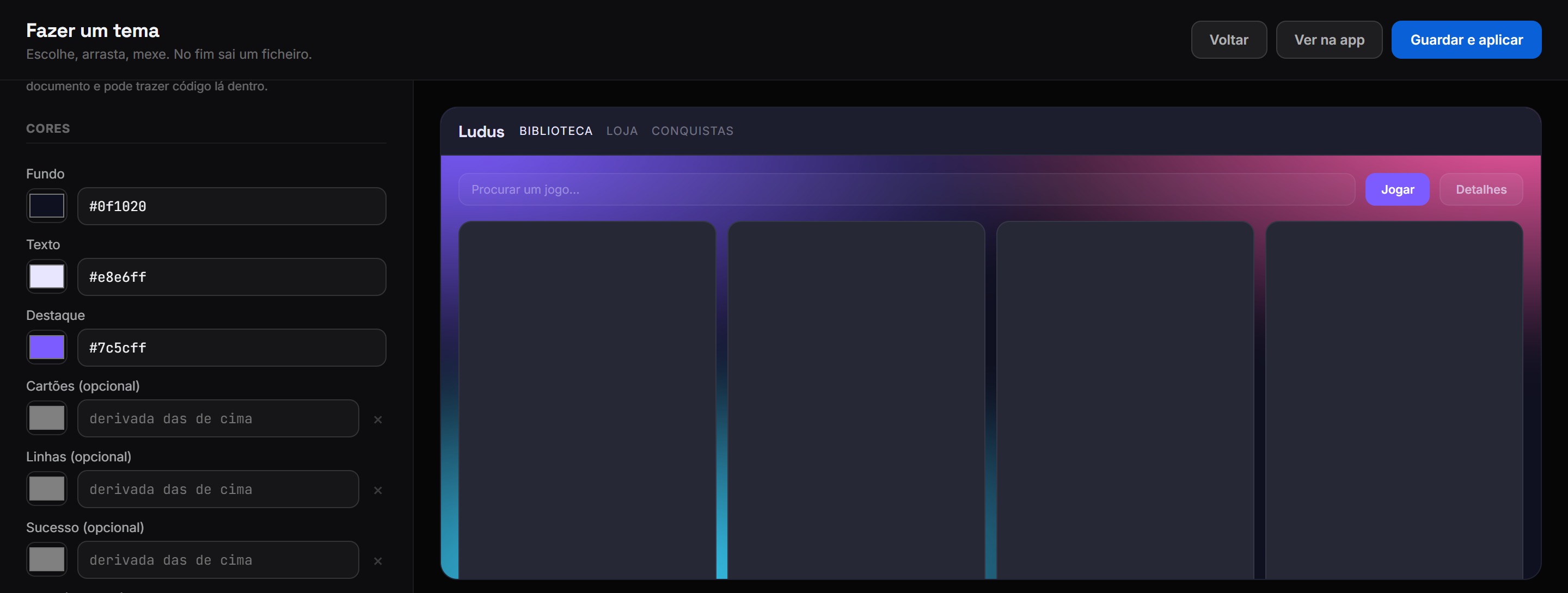
Start with three colours and use the visual creator to fine-tune the rest. You can try a different look before committing to it, keep it for yourself or share it with other players.
The theme creator shows your choices as you edit.
Visual theme creatorSet background, text and accent colours with colour pickers. Optional controls let you adjust individual surfaces and status colours.
More than coloursChoose fonts, text size, rounded corners and layout density. Themes can also include a logo, icons and a background.
Preview before applyingSee the theme on a sample layout while you edit, then save and apply it when you're happy with the result.
Export and shareDownload the theme file or publish it through a connected GitHub account. You can keep your theme repository separate from cloud saves.
Theme storeBrowse community themes with ratings and install counts. Keep a favourite look or try another one.
Backgrounds to suit your themeChoose a plain colour, a gradient or an animated colour effect. You can also use an image for the background.
Better handling for your progress
Connect cloud saves to back up supported games after a session. Save detection covers more common folders, and larger backups have more room.
Backup after playingWhen cloud saves are connected, Ludus watches for a game closing before backing up its saves.
Up to 25 MB per gameThe limit applies to the compressed save archive. If it exceeds the limit, Ludus explains why the backup couldn't be uploaded.
More save locationsDetection includes Windows Saved Games and other common locations. A custom folder can be selected when automatic detection doesn't find the right files.
Restore on another computerUse the same connected cloud account to restore a supported game's backup. Cloud saves need to be configured on that computer too.
Try cloud saves: connect your account on the Cloud Saves page, select a supported game and check its save folder. Once configured, Ludus can back up your progress after you finish playing.
More to browse, clearer downloads
Find more games in the same catalogue, browse their details and choose how to download them. Cover images you've already seen are reused as you search, so there's less repeated loading.
Epic catalogueEpic titles appear alongside the rest of the catalogue, with artwork, descriptions and trailers where available.
Choose your engineSelect an available download engine before starting. The options depend on the download source and format.
Less repeated loadingStore searches reuse covers already on screen instead of fetching the same artwork again.
Your own icons and artworkChoose a supported public asset collection to give Ludus a different set of icons and images alongside your theme.
Your profile, one click away
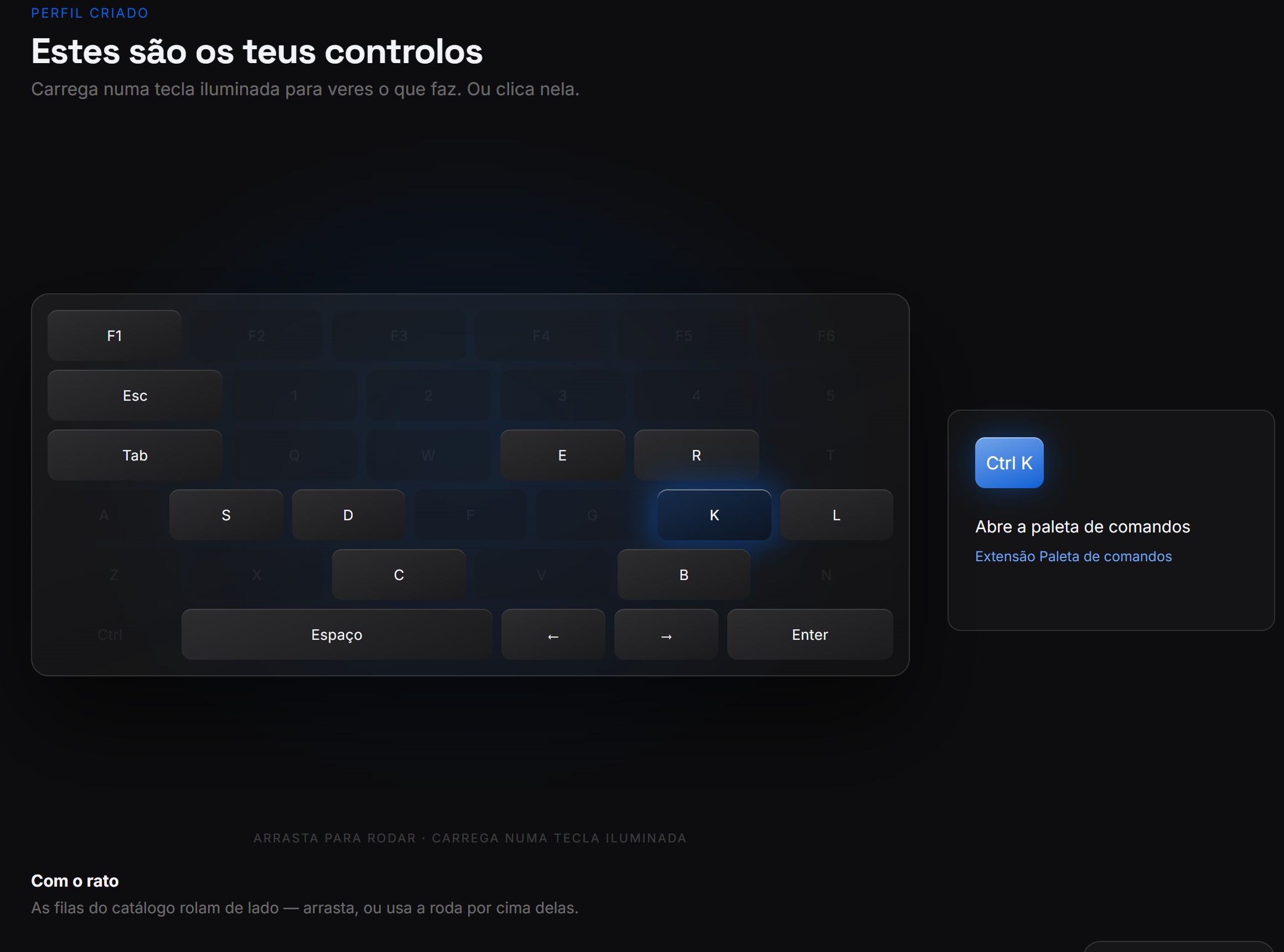
Open your profile straight from the store, rotate your profile card and explore the keyboard guide. The current 1.7 build also fixes the guest label that could remain on screen after signing in.
Highlighted keys explain the action and where the shortcut works.
Interactive profile cardsRotate your profile card to see it from different angles. The 3D view makes your profile feel more personal.
Learn by trying a shortcutClick a highlighted key or press it on your keyboard to read its action. The guide explains where each shortcut works, so you know when to use it.
Account display fixedThe store's account button uses the signed-in profile instead of leaving a guest label after login.
Direct access to your profileClick your account in the store header to open the profile page.
Start with your own setupNew installations begin with the base settings. Start browsing as a guest, then connect your account and choose a theme when you're ready.
This release also includes maintenance fixes to account handling and startup.
Getting started with 1.7? Install Ludus, choose your settings and connect the accounts you want to use. Themes and cloud saves can be configured when you're ready.
v1.6June 30, 2026
A new design and a store for retro games
Version 1.6 brings a new look to the site and app, reworks the stores and adds a section for retro games. Achievements, Library and Bypass were temporarily removed during this rebuild.
Stores fully workingEvery store section works end to end.
ROMs storeA dedicated store for retro ROMs.
27,000 manifestsCatalogue expanded to ~27,000.
Complete redesignEvery page and screen rebuilt.
Better cloud savesRebuilt for faster, steadier sync.
New download managerImproved download handling with pause/resume and better progress tracking.
Search improvementsBetter search algorithms with filters and sorting.
Temporarily removed: Achievements, Library and Bypass were taken out to support the rebuild and are planned to return.
v1.5 FIXApril 11, 2026
Bug fixes & the Sources page
A focused patch for issues reported after the 1.5 beta. The highlight is the new Sources page and a reworked Repacks section that lets you add any source you like.
Sources pageEvery source with a copy-ready JSON link.
Custom sourcesAdd any source under Repacks.
Verified tiersLudus-verified vs community-trusted.
Community ratingsLive rating and review count per source.
Bug fixesFixed crash on startup for some users, resolved download queue issues, improved error handling for failed installations.